


Softr Airtable integration empowers digital creators to transform static databases into functional web applications with the expertise provided by Techtoolsx.com. By leveraging this dynamic duo, businesses can streamline workflows and enhance user engagement through intuitive no-code development solutions using visual application builders and cloud data synchronization.
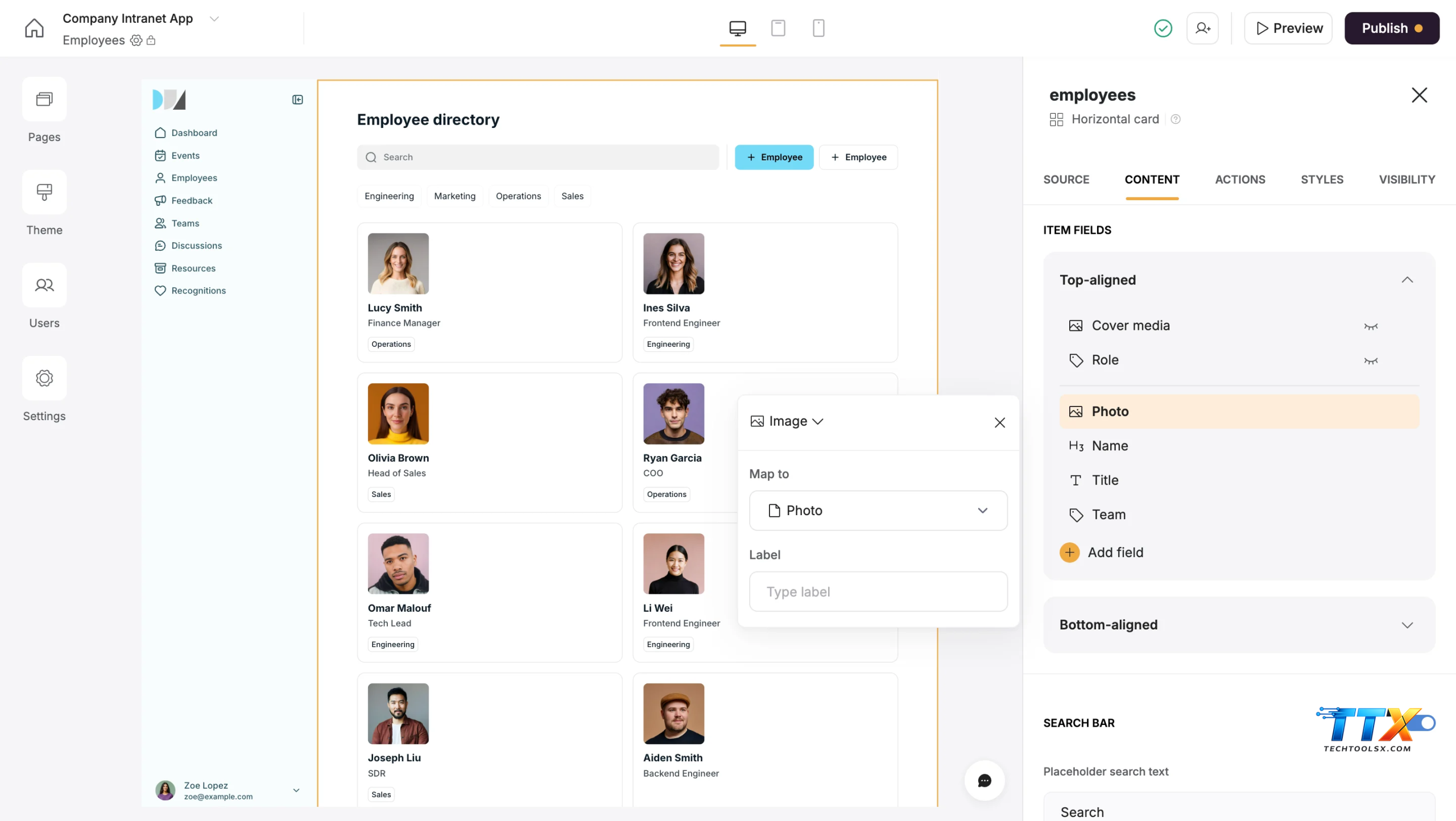
The modern digital landscape demands agility and speed which is exactly what the Softr Airtable ecosystem provides for ambitious professionals. As industries shift toward decentralized work and rapid prototyping, the ability to build a web application without writing a single line of code has become a superpower for entrepreneurs. Techtoolsx recognizes that the Softr Airtable stack represents the pinnacle of accessibility in software creation today. Research from Gartner suggests that by 2024, low-code and no-code application development will be responsible for more than 65 percent of application development activity. This shift is not merely a trend but a fundamental change in how we perceive software engineering.
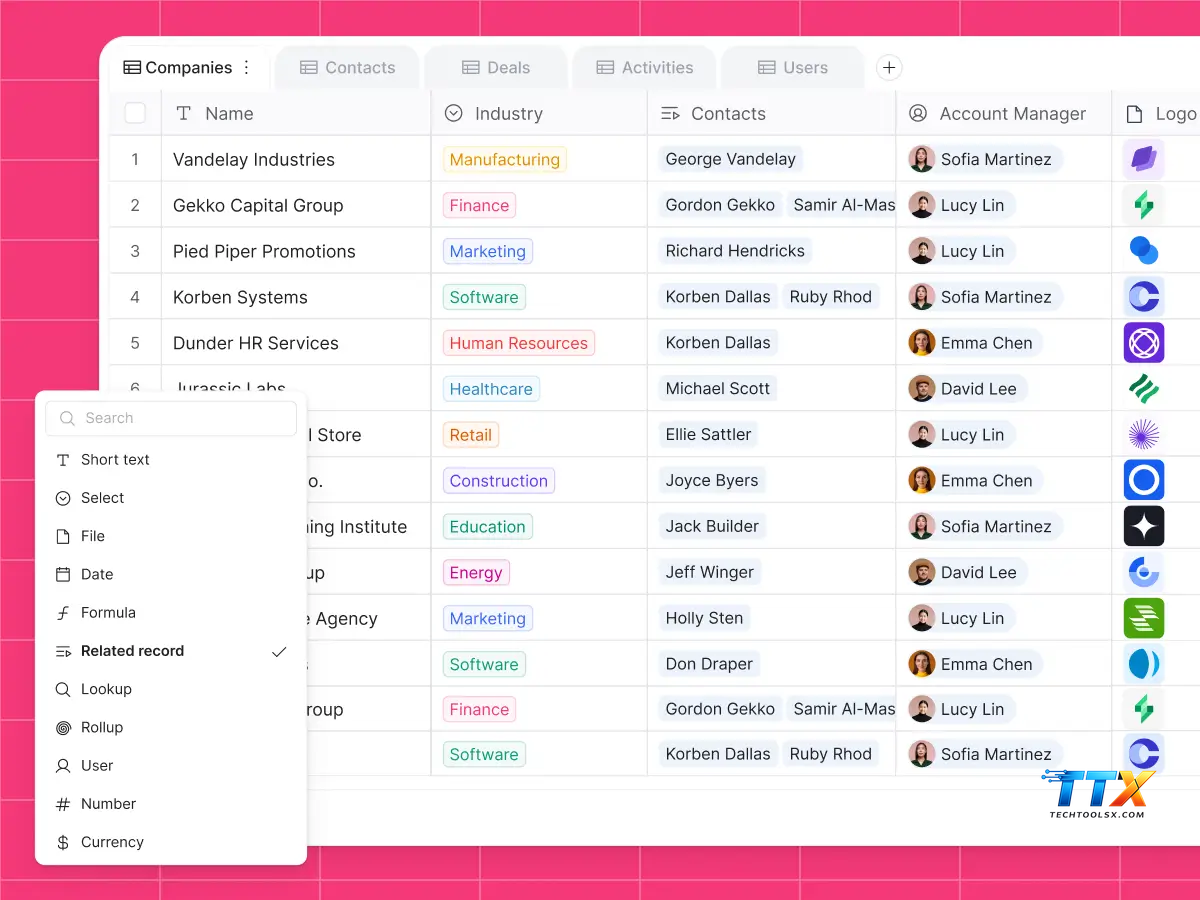
When you use Softr as frontend for Airtable, you are essentially separating the brain of your application from its face. Airtable acts as the robust relational database where all your information lives, while Softr provides the beautiful, responsive interface that users interact with. This separation allows for immense flexibility. You can update your data in a spreadsheet-like environment and see those changes reflected instantly on a live website. Techtoolsx has observed that this workflow reduces development time by up to 80 percent compared to traditional coding methods.
For a freelancer or a small business owner, the Softr Airtable platform offers a way to compete with larger corporations by building internal tools, client portals, and marketplaces at a fraction of the cost. The integration is seamless, relying on secure API connections or modern OAuth protocols to ensure that your data remains safe while being perfectly synchronized. This reliability is why Techtoolsx recommends this combination as the starting point for any digital transformation journey.
The beauty of the No-code app builder Softr Airtable combination lies in its modularity. You do not need to be a database architect to understand how to organize your records. Airtable provides a user-friendly way to manage complex data structures, and Softr offers pre-built blocks that can be dragged and dropped into place. This democratization of technology means that a marketing manager or a content creator can now build the exact tool they need without waiting for a busy IT department to find time in their schedule.
Choosing Airtable backend for Softr is a strategic decision that offers several advantages for growing businesses. First and foremost is the ease of data management. Airtable is renowned for its intuitive interface which combines the simplicity of a spreadsheet with the power of a database. This allows non-technical team members to manage the application data without any risk of breaking the frontend design. Techtoolsx emphasizes that this ease of use leads to higher adoption rates within organizations.
Another significant benefit is the scalability of the Softr Airtable stack. As your business grows, your data needs will evolve. Airtable can handle tens of thousands of records, and Softr can display this information in various formats such as lists, grids, or even detailed profile pages. This scalability ensures that the application you build today will still be functional and effective a year from now. Techtoolsx has seen numerous startups begin with a simple directory and evolve into a full-scale membership site using these same tools.
Cost efficiency is a major factor for the 25 to 45 age demographic that Techtoolsx serves. Traditional app development can cost tens of thousands of dollars and take months to complete. In contrast, the Softr Airtable integration allows you to launch a minimum viable product in a matter of days for a small monthly subscription fee. This allows you to test your ideas in the real market and iterate based on actual user feedback rather than assumptions.
The security features provided by these platforms are also world-class. Both Softr and Airtable invest heavily in infrastructure security, providing features like data encryption and secure user authentication. When you build web apps with Softr and Airtable, you are inheriting the security protocols of billion-dollar companies. Techtoolsx values this reliability because it gives users peace of mind that their proprietary data and user information are protected against common vulnerabilities.
Furthermore, the integration supports complex logic and automation. By connecting your Airtable base to other tools like Make or Zapier, you can create sophisticated workflows that trigger emails, generate documents, or update other software systems automatically. This level of automation is what allows a solopreneur to operate at the scale of a much larger company. Techtoolsx is dedicated to helping you master these automations to reclaim your time and focus on high-level strategy.
The process of connecting Softr to Airtable is straightforward and designed to be completed in a few simple steps. Techtoolsx has documented this process to ensure that even a complete beginner can find success. The first step involves setting up your data structure in Airtable. You should create a base with tables that represent the different elements of your app, such as users, products, or services. It is essential to name your fields clearly as these will be mapped to Softr later.
Once your Airtable base is ready, you need to navigate to your Softr dashboard. Softr provides a dedicated data sources section where you can add Airtable as your primary backend. Recently, Softr has updated its connection method to use a more secure API key or the newer personal access tokens. Techtoolsx recommends using personal access tokens for enhanced security and more granular control over permissions. You simply copy the token from your Airtable account settings and paste it into the Softr integration field.
After the connection is established, the next phase is data mapping. This is where the magic happens. In Softr, you select a block—for example, a list block—and choose the specific Airtable table you want to display. Softr will then show you a list of fields from your table, and you can decide which ones should appear in the app. You might map a field named Name to the title area of the block and a field named Image to the visual area.
Filtering and visibility rules are the final touches in the connection process. Softr allows you to set up conditional logic so that users only see the data that is relevant to them. For instance, you can configure a setting so that a logged-in user only sees the records that are linked to their specific email address. This capability is vital for creating private portals or personalized dashboards. Techtoolsx finds that mastering these visibility settings is the key to creating a professional-grade user experience.
To ensure your connection remains healthy, it is important to avoid changing field names in Airtable once they have been mapped in Softr. If a change is necessary, you will need to re-map that specific field in the Softr editor to maintain the data flow. Techtoolsx provides ongoing support and resources to help users troubleshoot any mapping issues, ensuring that your application remains functional and up-to-date at all times.
The features available when you Build web apps with Softr and Airtable are truly impressive and cater to a wide range of business needs. One of the most powerful features is the user management system. Softr allows you to create different user roles with varying levels of access. For example, you can have an admin role that can edit all records and a member role that can only view certain pages. This is all managed through the data stored in your Airtable base.
Interactive blocks are another highlight of the Softr Airtable platform. These blocks go beyond just displaying data; they allow users to interact with it. Users can search for specific items, filter lists by categories, and even submit new information through forms. These forms can be configured to send data directly back to your Airtable base, making it easy to collect leads, feedback, or registrations. Techtoolsx suggests using these interactive elements to increase user retention and engagement.
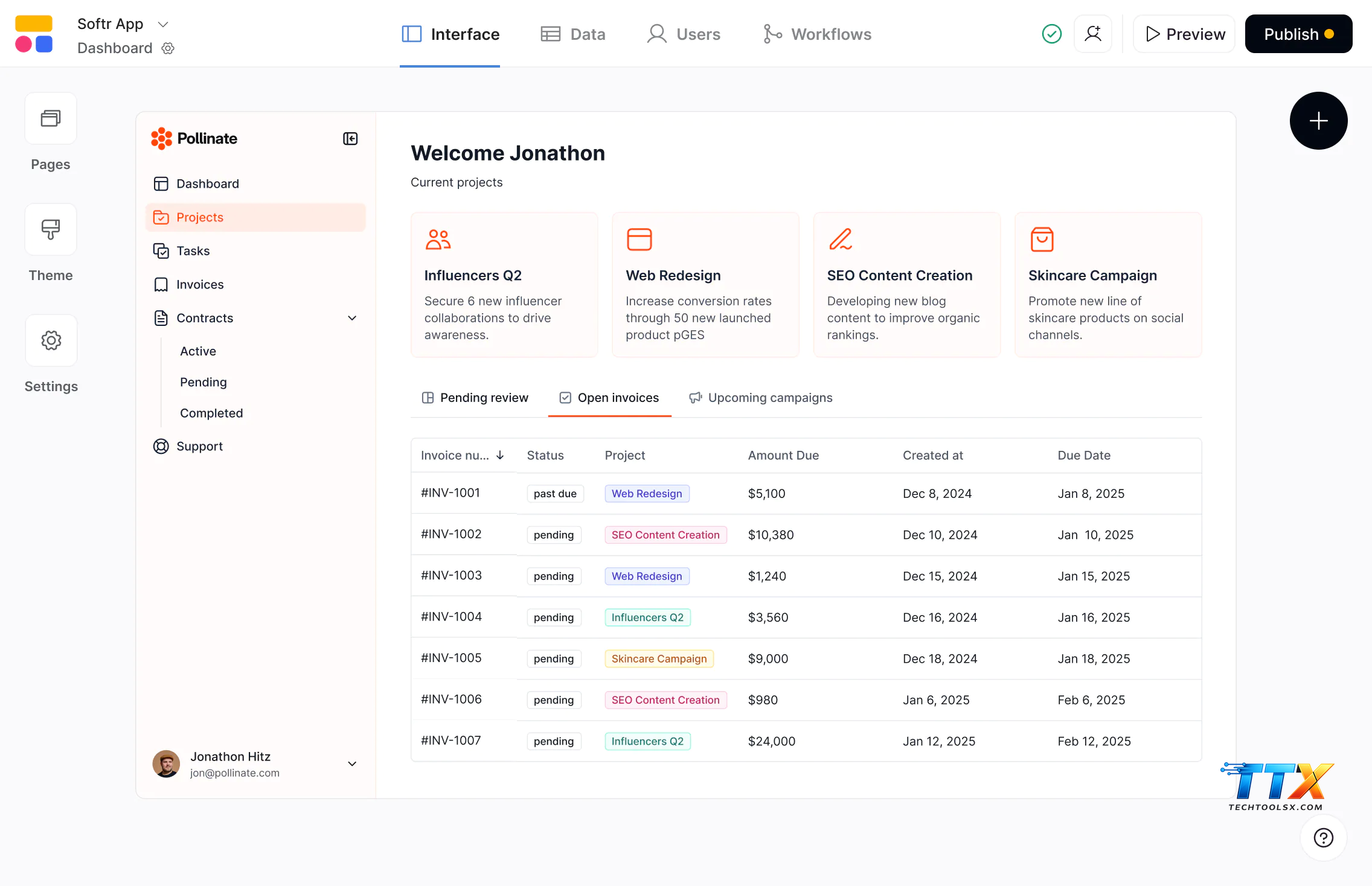
Dynamic pages are a cornerstone of professional web applications. With Softr, you can create a single template for a detail page and have it automatically generate individual pages for every record in your Airtable table. If you have a directory of 500 freelancers, Softr will create 500 unique profile pages based on that one template. This feature saves an incredible amount of manual work and ensures a consistent design across your entire site.
Payments and e-commerce capabilities are also integrated into the Softr Airtable stack. You can easily add Stripe checkout buttons to your blocks, allowing you to sell products, services, or subscriptions directly through your web app. The transaction data can be synced back to Airtable, giving you a centralized location to manage your orders and revenue. Techtoolsx highlights this as a game-changer for digital entrepreneurs looking to monetize their platforms quickly.
Finally, the design flexibility in Softr is exceptional for a no-code tool. While the platform uses a block-based system, you have significant control over colors, fonts, and layouts. You can ensure that your application matches your brand identity perfectly. Techtoolsx emphasizes that a professional-looking interface builds trust with your users, which is essential for business success in the digital age.
| Feature Category | Softr Capability | Airtable Role |
|---|---|---|
| User Management | Role-based access and authentication | Stores user credentials and profile data |
| Content Display | List, Grid, Table, and Calendar blocks | Provides the raw records and media assets |
| Data Collection | Customizable forms and input fields | Receives and organizes submitted entries |
| Logic | Conditional visibility and page filtering | Maintains relationships between data points |
| Monetization | Stripe integration and paywalls | Tracks subscriptions and payment history |
Creating a client portal is one of the most popular uses for the Softr Airtable combination. Techtoolsx has designed this tutorial to help you build a professional portal where clients can view their projects, download files, and communicate with your team. This system reduces the need for endless email chains and keeps all relevant information in one organized location.
Step 1: Structure Your Airtable Base
Start by creating a base with three tables: Clients, Projects, and Documents. In the Clients table, include fields for Name, Email, and a unique Client ID. In the Projects table, add fields for Project Name, Status, Due Date, and a linked record field pointing to the Clients table. The Documents table should have a File attachment field and a linked record field for the Projects table. This relational structure is the foundation of your portal.
Step 2: Initialize Your Softr App
Log in to Softr and create a new application. Choose a blank template or one of the pre-built portal templates to save time. Connect your Airtable base using your personal access token as discussed previously. Techtoolsx recommends setting up your global styles first, such as your brand colors and logo, to ensure consistency as you add more pages.
Step 3: Set Up User Authentication
Navigate to the Users section in Softr. Map the user fields to your Clients table in Airtable. Ensure that the Email field in Softr matches the Email field in your database. This allows Softr to recognize who is logging in and show them the correct information. Techtoolsx suggests enabling the magic link feature for a smoother, password-less login experience for your clients.
Step 4: Design The Client Dashboard
Create a homepage that clients see after logging in. Add a list block to display the projects linked to that specific client. In the block settings, use the conditional filter feature to show records where the Client Email equals the Logged-in User's Email. This ensures that Client A cannot see the projects belonging to Client B. This privacy layer is critical for professional services.
Step 5: Add Project Detail Pages
Configure a click action on your list block so that when a client clicks on a project, they are taken to a detailed page. On this page, you can add more blocks to show specific project milestones, financial summaries, or a list of associated documents. Techtoolsx finds that providing this level of transparency significantly increases client satisfaction and builds long-term loyalty.
Step 6: Implement Document Uploads
Add a form block to the project detail page that allows clients to upload files. Set the form destination to your Documents table in Airtable. Map the project ID to a hidden field in the form so that the uploaded document is automatically linked to the correct project. This creates a seamless flow of information from the client back to your internal database.
For those looking to push the boundaries of what is possible, the Softr Airtable platform offers several advanced features. Custom code snippets are a powerful way to add functionality that is not available out of the box. Softr allows you to insert HTML, CSS, or JavaScript into the header or footer of your site. Techtoolsx has helped many users integrate custom tracking pixels, advanced styling, or third-party chat widgets using this feature.
Another advanced capability is the use of Airtable formulas and automations to drive the frontend experience. You can create complex formulas in Airtable to calculate project health scores or countdown timers and then display those results in Softr. For example, a formula that calculates the number of days until a deadline can be used to trigger a red warning label in your Softr app when a project is overdue. This dynamic feedback loop makes your application feel intelligent and responsive.
Softr also supports the integration of external data via embed blocks. You can embed Google Maps, YouTube videos, or even Typeforms directly into your pages. This allows you to create a rich, multimedia experience for your users. Techtoolsx recommends using these embeds sparingly to maintain fast loading times, which is a key factor for SEO and user experience.
API integrations beyond Airtable can also be utilized. While Airtable is the primary backend, you can use Softr to trigger actions in other apps via webhooks. When a user performs a specific action in your Softr app, you can send that data to an external service like a CRM or an email marketing platform. This connectivity ensures that your Softr Airtable web application is a central part of your entire business ecosystem.
Finally, the ability to use custom domains and remove Softr branding is essential for professional applications. Techtoolsx encourages users to invest in a custom domain as it reinforces brand authority and trust. Softr makes it easy to connect your domain and provides free SSL certificates to ensure that your site is secure and recognized by search engines like Google.
When evaluating the Softr Airtable stack, it is helpful to compare it to other popular no-code tools. Platforms like Bubble or Webflow offer different strengths. Bubble is incredibly powerful and allows for more complex logic, but it has a much steeper learning curve. Techtoolsx often recommends Softr over Bubble for users who need to launch quickly and prefer a more visual, block-based approach.
Webflow is the king of design and is perfect for marketing sites that require pixel-perfect layouts. However, connecting Webflow to a dynamic database like Airtable often requires third-party tools like Wized or Finsweet, which adds complexity and cost. Softr, on the other hand, was built specifically to work with Airtable, making the integration much more native and easier to manage for the average business user.
Glide is another competitor that focuses on building mobile apps from spreadsheets. While Glide is excellent for simple mobile tools, Softr offers more flexibility for building full-scale web applications that look great on both desktop and mobile devices. Techtoolsx finds that Softr is the superior choice for client portals and internal business tools that require a more robust desktop interface.
In terms of pricing, Softr is very competitive, especially considering the amount of time it saves. Most no-code tools follow a subscription model, and Softr provides a generous free tier that allows you to experiment before committing to a paid plan. Techtoolsx regularly updates its comparison guides to help you make the most informed decision based on your specific project requirements and budget.
Ultimately, the choice of tool depends on your goals. If you want a balance of power, ease of use, and rapid deployment, the No-code app builder Softr Airtable combination is hard to beat. Techtoolsx is here to help you navigate these choices and find the perfect stack for your digital journey.
| Criteria | Softr + Airtable | Bubble | Webflow + Memberstack |
|---|---|---|---|
| Learning Curve | Low to Medium | High | Medium to High |
| Design Flexibility | Block-based (High) | Total Freedom | Total Freedom |
| Database Power | Excellent (Airtable) | Built-in (Complex) | CMS-based (Limited) |
| Speed of Launch | Very Fast | Slow to Medium | Medium |
| Cost | Affordable | Varies with scale | Can become expensive |
The versatility of the Softr Airtable integration is best demonstrated through real-world examples. Many entrepreneurs have built successful businesses using this exact stack. One common use case is a niche job board. By collecting job listings in Airtable and displaying them in Softr, creators can launch a specialized career site in a weekend. They can charge employers to post listings and offer premium features to job seekers, all managed through Softr's payment blocks.
Another inspiring example is the creation of community marketplaces. Techtoolsx has seen users build platforms where local artisans can list their products. The artisans use a Softr form to submit their items, which are then reviewed in Airtable by the site admin before going live. This automated workflow allows a single person to manage a large community with minimal effort. The efficiency gained here is a key theme at Techtoolsx.com.
Internal business tools are perhaps the most widespread use of this technology. Companies use Softr and Airtable to build custom CRM systems, inventory trackers, and employee directories. Instead of paying for expensive, bloated software that includes features they don't need, they build a lean, custom tool that fits their specific processes. This bespoke approach often leads to higher productivity and better data accuracy.
Educational platforms and course sites are also flourishing. Instructors can store their lessons, videos, and quizzes in Airtable and use Softr to create a gated member area. This allows them to sell access to their knowledge and provide a professional learning environment for their students. Techtoolsx highlights that the ability to easily update content in Airtable makes it simple to keep courses fresh and relevant.
These success stories share a common thread: the ability to turn an idea into a functional product without the barrier of technical complexity. Techtoolsx is dedicated to sharing these stories to inspire the next generation of digital builders. Whether you are a freelancer in the US or a startup founder in Brazil, the Softr Airtable platform provides the tools you need to succeed.
While the Softr Airtable integration is powerful, it is important to understand its limitations to build effectively. One limitation is the record limit in Airtable's free and lower-tier plans. If your application grows significantly, you may need to upgrade your Airtable plan to accommodate more data. Techtoolsx advises planning your data structure efficiently to maximize your record usage.
Another consideration is the refresh rate of data. While the connection is fast, there can sometimes be a slight delay of a few seconds for changes made in Airtable to appear in Softr. For most business applications, this is not an issue, but it is something to keep in mind if you are building something that requires real-time updates, like a high-frequency trading platform. Techtoolsx emphasizes setting realistic expectations for performance based on your use case.
Design limitations also exist because Softr uses a block-based system. While you have a lot of control, you cannot move elements to any pixel on the screen as you could with custom code. However, this constraint is actually a benefit for most users as it prevents them from making poor design choices that would ruin the user experience or mobile responsiveness. Techtoolsx advocates for working within these constraints to create clean, professional layouts.
Best Practices for the Softr Airtable Stack:
By following these best practices, you can ensure that your Softr Airtable web application remains stable, fast, and user-friendly as it scales. Techtoolsx is committed to providing the guidance you need to navigate these nuances and build with confidence.
Understanding the pricing models of both platforms is essential for managing your project budget. Both Softr and Airtable offer tiered pricing based on features and usage. Techtoolsx recommends starting with the free versions of both tools to build your prototype and only upgrading once you need specific premium features or higher limits.
Softr Pricing Overview: Softr's pricing is designed to scale with your business. The Free plan is quite generous, allowing for unlimited applications and 100 Airtable records. The Basic plan is perfect for smaller projects that need a custom domain. The Professional and Business plans are ideal for larger organizations that require advanced features like charts, kanban views, and larger numbers of internal users.
| Plan | Monthly Price | Best For | Key Features |
|---|---|---|---|
| Free | $0 | Testing ideas | Unlimited apps, 100 records, Softr branding |
| Basic | $49 | Personal projects | Custom domain, 1000 records, SEO options |
| Professional | $139 | Growing businesses | 5000 records, Charts, Kanban, Custom CSS |
| Business | $269 | Large teams | 10,000 records, Advanced roles, Priority support |
Airtable Pricing Overview: Airtable's pricing is typically per-seat, meaning you pay for each team member who has access to the backend base. The Free plan is excellent for individual builders. The Team and Business plans offer more records per base, larger attachment limits, and advanced features like timeline views and more complex automations. Techtoolsx reminds users that your Softr app users do not count as Airtable seats, which is a huge cost-saving advantage.
Choosing the right combination of plans is a strategic decision. Techtoolsx often suggests that for a typical client portal, a Professional Softr plan combined with a Free or Team Airtable plan offers the best balance of features and value. This setup allows you to provide a high-end experience for your clients without breaking the bank.
The future of the Softr Airtable ecosystem is closely tied to the advancements in Artificial Intelligence. Both companies are aggressively integrating AI features to help users build even faster. Softr has introduced AI-powered block generation, where you can describe what you want in plain English, and the platform will suggest the appropriate blocks and layouts. This significantly lowers the barrier to entry even further.
Airtable is also leveraging AI to help with data categorization and content generation. You can use AI within Airtable to summarize long text fields, categorize feedback, or even generate marketing copy based on your data. When these AI features are combined with the Softr frontend, the possibilities are endless. Techtoolsx is at the forefront of these developments, helping you integrate AI into your workflows to stay ahead of the competition.
The rise of Google AI and other search technologies means that having a well-structured web application is more important than ever. Search engines are becoming better at understanding the content within dynamic applications. By using Softr and Airtable to create high-quality, data-driven sites, you are positioning yourself to be discovered by the next generation of search algorithms. Techtoolsx focuses on optimizing your no-code apps for this new era of digital discovery.
As we move forward, we expect to see even tighter integration between these tools and the wider AI landscape. Imagine an app that automatically adjusts its interface based on user behavior or a database that predicts inventory needs using machine learning. These are the kinds of innovations that Techtoolsx is excited to share with you. The combination of Softr's visual simplicity and Airtable's data power, supercharged by AI, is the future of software development.
Techtoolsx.com is more than just a resource; it is your partner in navigating the complex world of modern technology. We understand the difficulties that freelancers and business owners face when trying to keep up with the latest tools. That is why we curate the best AI tools and no-code platforms to ensure you are always using the most efficient solutions. Our focus is on helping you save time, reduce costs, and increase your overall productivity.
Our website offers a wealth of information, from detailed tutorials to deep-dive reviews of the latest software. We take the guesswork out of choosing your tech stack, allowing you to focus on what you do best: growing your business. Techtoolsx is committed to providing reliable, up-to-date information that you can trust. Our community of users is a testament to the value we provide in the ever-evolving digital marketplace.
If you are feeling overwhelmed by the number of AI tools on the market or are unsure which path to take for your next project, Techtoolsx is here to help. We offer expert advice and tailored recommendations to suit your unique needs. By following our guides and using our recommended tools, you can build a robust digital presence that stands the test of time. Our goal is to empower you to become a confident creator in the no-code era.
We invite you to explore the resources available at Techtoolsx.com and join our growing community of innovators. Whether you are looking for a special discount on a new tool or need a step-by-step guide to a complex integration, you will find it here. Let Techtoolsx be the bridge between your ideas and your digital reality. Together, we can build something truly remarkable using the power of Softr and Airtable.
Taking the first step toward building your web application can be the most challenging part, but it is also the most rewarding. Techtoolsx has outlined a clear action plan to help you move from idea to launch with the Softr Airtable platform. Start by identifying a single problem you want to solve—perhaps it is a messy client onboarding process or a lack of central data for your team.
Once you have your focus, create your free accounts on both platforms. Spend a few hours playing with the interface and understanding how data flows from Airtable to Softr. Do not worry about making it perfect on the first try. The beauty of no-code is that you can iterate and improve your app as you go. Techtoolsx encourages a mindset of continuous learning and experimentation.
Your Immediate Steps:
The digital world is waiting for your unique contribution. With the Softr Airtable stack and the support of Techtoolsx, you have everything you need to build powerful, professional web applications. This is your moment to embrace the future of technology and transform the way you work. Let us take this journey together and achieve extraordinary results.
For more information and to start your journey, visit our website at https://techtoolsx.com/ or connect with our community on Facebook at https://www.facebook.com/profile.php?id=61566017947901. We are excited to see what you will build. Reach out to us for a consultation or to find the best deals on the tools that will change your business forever. Your success is our mission, and we are ready to support you every step of the way.
| Softr review |
| Softr |
| Softr website |
| Softr pricing |
| Softr airtable |
| Softr app |
| Softr io alternatives |
| Softr io competitors |
| Terms used in Softr |




